How to Disable YouTube Shorts: Official Settings and Limits (2026)
Disable the YouTube Shorts feed with the official 0-minute limit on mobile, what still leaks through, and safer alternatives to modded apps.
By Priya Sharma
On this page
YouTube Shorts disable searches spiked after Google added a zero-minute Shorts feed limit on mobile. This guide maps the official setting, what still leaks Shorts into your day, and which old tricks are dead in 2026.
Where the Shorts feed limit lives
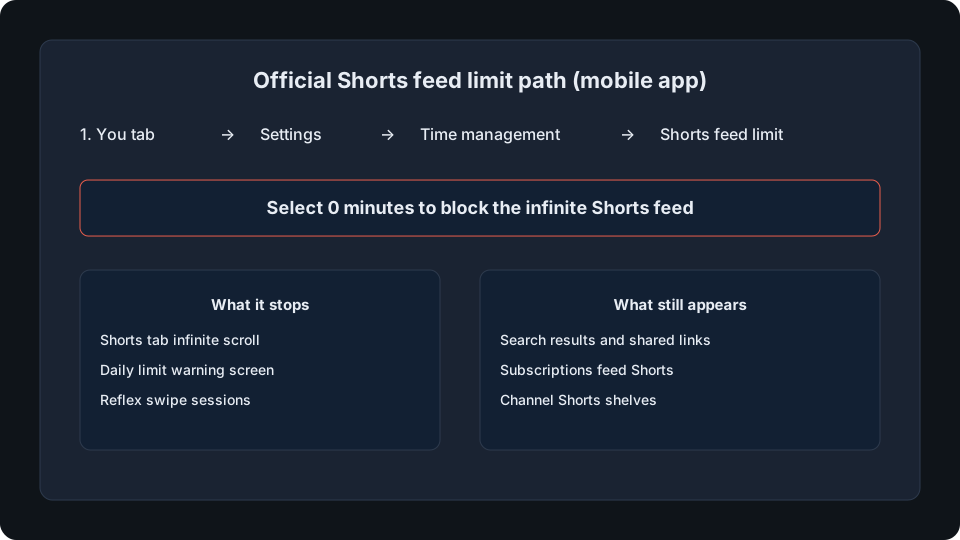
YouTube now ships a real control for the infinite Shorts feed on iOS and Android. Open the You tab, tap Settings, choose Time management, then Shorts feed limit. Options run from 15 minutes up to 2 hours, plus zero minutes if your app is current.
Zero minutes stops the swipeable Shorts tab for that Google account. When you open Shorts you see a daily limit screen instead of an endless vertical feed. The menu label is Shorts feed limit under Time management, not a generic screen-time toggle.
What zero minutes actually blocks
Think of the setting as a brake on the Shorts tab habit, not a kill switch for every short video on YouTube. It targets the dedicated Shorts feed where most doom-scroll happens.
After you set zero minutes, the tab itself becomes a hard stop. That is the behavior most readers want when they search disable youtube shorts.
- Shorts tab infinite scroll on the mobile app
- Same-day reopen after you hit the limit screen
- Reflex opens when you meant to check subscriptions
What zero minutes does not remove
Shorts still appear outside the tab. Subscriptions lists them like normal uploads, search mixes them into results, channel pages keep a Shorts shelf, and shared links open directly.
Home may still surface a Shorts row depending on account and test buckets. Expect friction on the tab, not invisibility across the product.
Timeline: when zero minutes rolled out
October 2025 added 15-minute to 2-hour limits without a zero option. January 2026 brought zero minutes for supervised accounts. April 2026 opened zero minutes to standard adult accounts on current app builds.
If you do not see Shorts feed limit, update the app first. Outdated guides that say YouTube offers no official control are stale after April 2026.
Supervised vs adult accounts
On a standard adult account the limit screen includes a dismiss option for the rest of the day. That makes the control a friction layer: helpful for breaking reflex, easy to override when you choose.
Supervised teen accounts (roughly 13-17) do not get dismiss. The Shorts feed stays locked until the daily reset. Parents who need a real lock should use Family Center limits, not only their own adult settings.
Control level by device and surface
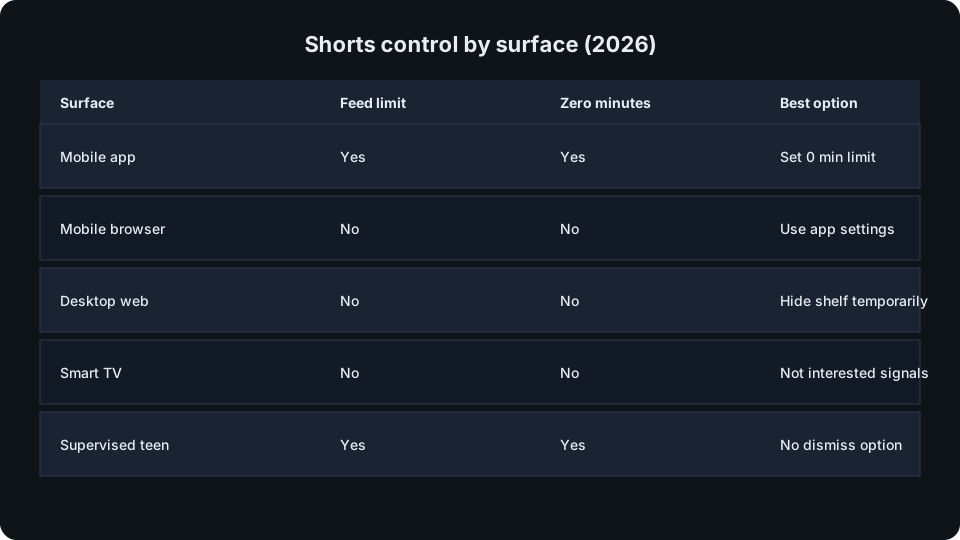
Only the mobile app exposes Shorts feed limit today. Desktop web has no Time management equivalent. Smart TV and console apps show Shorts with no limit menu. Mobile browser sessions ignore app settings entirely.
Apply the limit on every phone and tablet where you actually scroll. Many people fix mobile then lose the battle on a TV profile signed into the same account.
Shorts still showing: fix order
Force-quit the app after saving. Android clears the card from recents; iPhone swipes the app away in the app switcher. Cached layout sometimes keeps the old feed until restart.
Confirm you edited the account that is active, update the app, and avoid youtube.com in mobile Safari when testing. If you dismissed a limit banner earlier, the cap may be suspended until tomorrow on adult accounts.
- Update YouTube from the store
- Verify the signed-in Google account
- Force-quit and reopen the app
- Repeat on TV and tablet if needed
Desktop and TV: what actually works
On youtube.com some accounts see a temporary hide control on the home Shorts shelf. Treat it as cosmetic; YouTube does not document persistence.
Not interested on individual Shorts and Do not recommend channel send algorithm signals. They soften recommendations over weeks but never remove the format.
App-level screen time limits on iOS or Android cap total YouTube time. They are blunt, yet effective when the goal is less phone use, not Shorts-only blocking.
Methods that no longer work (and risky ones)
Side-loading ancient YouTube APKs hits unsupported client walls, Play Protect warnings, and on modern Android blocked low-target installs. Downgrading system YouTube builds fails for the same reason on phones that shipped with Shorts already enabled.
Modded clients and browser extensions that strip Shorts UI need broad site permissions. Several high-profile extension takeovers in 2025 turned popular YouTube tools malicious. The official limit is slower but does not hand your session to a stranger.
YouTube Premium does not remove Shorts
Premium removes ads and adds downloads and background play. The Shorts tab, shelves, and player stay. Paying does not substitute for Time management limits or recommendation hygiene.
Habits that beat settings alone
Open YouTube through search with a target video instead of the home feed. Pin Subscriptions as your landing tab. Remove the icon from your home screen so reflex opens cost an extra tap.
Pause watch history when you want a cold-start recommendation mix. Use bedtime and break reminders as cheap circuit breakers even though they do not cap minutes by themselves.
Creators leaving Shorts for long-form
Channels that pivot from Shorts to long uploads often lose velocity for a few weeks. Keep upload cadence steady and protect early engagement on new long videos.
If you are rebuilding watch time for Partner Program goals, pair retention-first uploads with gradual subscriber support from a password-free checkout. Compare buy YouTube subscribers tiers when social proof is the bottleneck, not content quality.
Sara B.
First-hour engagement ritual is the part most teams skip. Costs nothing and changes reach more than hashtag swaps.
Nina P.
We paired a small follower package with grid cleanup and profile conversion doubled in two weeks.